Hey there, fellow facility managers, IT teams, and anyone who’s ever stared at a cluttered key cabinet at 2 a.m. wondering where that maintenance fob went—raise your hand. Raises hand sheepishly As someone who’s spent the last 7 years working for a smart key and USB cabinet supplier (yeah, that’s me—we build the things that fix exactly that chaos), I can’t tell you how many times I’ve gotten this question: “My smart cabinet was awesome for the first month… now it’s slow, glitching, and half the keys are unresponsive. What gives?” Smart Key and USB Cabinet
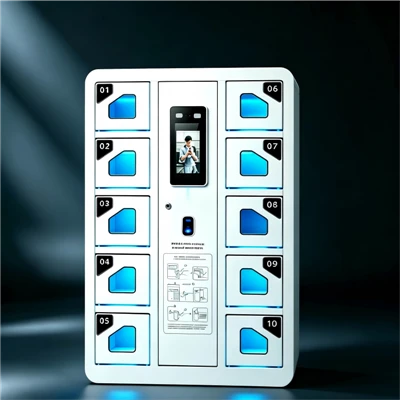
Look, I get it. When you first install these cabinets, it feels like magic—tap a key fob to assign a laptop, log in from your phone, no more sticky key drawers. But like any tech, they don’t run on “set it and forget it.” Over the months, things pile up: too many devices, old firmware, even a crumb from the break room sandwich you ate by the cabinet (don’t lie, I’ve seen worse). Today, I’m breaking down exactly how to optimize your smart key and USB cabinet performance—no fancy IT degree required, just real, actionable tips we’ve tested on thousands of our units (and fixed a lot of customer panic calls over).
First off, let’s talk about the stuff people miss most: basic device load management. This isn’t just “don’t cram 10 keys into a slot made for 5.” Wait, actually, it is that. But not in the way you think. A lot of teams overstuff their cabinets because they think “more slots = more productivity,” but every smart key cabinet has a max signal threshold. Think of it like Wi-Fi in a crowded coffee shop—too many devices competing for bandwidth, and everyone’s loading slow.
Last quarter, we had a customer at a downtown hospital who crammed 120 key fobs into a cabinet rated for 80. For two weeks, they were dealing with unassigned keys, 10-second lag when scanning fobs, and even a few “key not found” errors mid-shift. They thought the cabinet was broken—turns out, it was just overcrowded. Here’s the rule we now share with every client: stay 20% under your cabinet’s stated capacity. Yeah, that means a cabinet that can hold 100 keys only gets 80 tops. Why? The RFID (that’s the tech that talks to your key fobs) needs space to ping each device without fighting. Same goes for USB slots: if you have a cabinet with 50 USB ports, don’t plug 50 external hard drives, chargers, and random cables in all at once—leave at least 10 ports free for signal breathing room.
Another quick hack here: audit your devices monthly. We have a free tool in our cabinet’s software dashboard that lets you flag inactive fobs. If you have 15 fobs that haven’t been used in 3 months, retire ’em. No need to keep them taking up slot space. I promise, no one’s going to ask for that old 2022 company-issued laptop key next week.
Next up, firmware updates. I know, I know—you see the “update available” pop-up and click “remind me later” because who has time for tech updates when you’re managing 10 other things? But here’s the secret: most of the glitches people blame on “bad hardware” are actually just old firmware. We push updates quarterly, and every single one fixes performance gaps—faster RFID pings, better USB charging stability, even bug fixes that prevent that random “locked cabinet” error when you try to check a tool.
Last month, an event planner client called us panicking because her USB cabinet kept dying mid-setup for a conference. We asked when they last updated it—they had skipped the last 3 updates. We walked them through updating in 5 minutes (it’s literally “log in > go to settings > click ‘update firmware’” — no reboot needed mid-work) and boom, the cabinet ran like new. Pro tip: set a calendar reminder for the first Monday of every month to check for updates. It’s 2 minutes of work that saves you hours of downtime.
Wait, can we talk about the physical environment of the cabinet? Because this is the thing most people never consider, and it’s such a big one. Smart cabinets live in some weird spots: the dusty garage storage area, the break room next to the microwave that runs 24/7, even by a window that gets direct sunlight all day. All of that messes with performance.
We did a test last year: we put two identical smart cabinets in the same room. One by the microwave (which emits low-level electromagnetic interference, EMI) and one in a quiet office nook. The microwave cabinet had 3x more unresponsive fobs, and USB charging speeds were 40% slower. The other? Zero issues. Another client kept their cabinet in the basement, and the concrete walls blocked the RFID signal so much that keys by the back wall never worked. We helped them move it to a central wall, and suddenly all slots were detectable.
Here’s the rule of thumb for placement: keep the cabinet at least 3 feet away from anything that emits EMI—microwaves, Wi-Fi routers, power tools, even other electronics like printers. Avoid direct sunlight (it overheats the internal sensors) and damp areas (mold is bad for tech, obviously). If you have to put it in a basement, use a signal extender (we sell these, but they’re super simple to install) to boost the RFID signal to the back slots.
Now, let’s dive into USB-specific optimization, because that’s a whole other beast. A lot of teams use these cabinets to charge laptops, tablets, and phones, but if you plug in high-power devices (like a 16-inch MacBook Pro) alongside 10 low-power earbuds, it strains the USB controller. Think of it like a power strip: plugging in a space heater, a fridge, and a lamp all at once will make the power strip act weird. Same here.
We recommend grouping devices by power needs in the cabinet’s dashboard. The software lets you tag fobs/USB slots as “high-power” or “low-power” — so if you have a busy day with a lot of laptop chargers, you can temporarily pause a few low-power slots to avoid overloading. Also, clean the USB ports every 2 weeks! Dirt, crumbs, and dust build up on the connectors, which slows data transfer and charging. We use a soft, dry brush (no liquid!) to gently wipe the insides of the ports—takes 10 seconds, and it’s saved so many clients from USB transfer errors.
Oh, and one thing people forget: backup your cabinet data weekly. If the cabinet glitches and loses tracking of a key fob, you don’t want to lose all the data of who checked it out. The software automatically backs up if you set it to, but make sure you enable that feature. We had a client once who didn’t, and when their cabinet died, they lost 2 weeks of access logs for a construction site—total headache. Just toggle “auto backup” in settings, and you’re done.
Wait, I should also address common mistakes new owners make. Like, don’t use third-party fobs or USB drives. I know, it’s tempting to grab a cheap fob off Amazon to replace a lost one, but those don’t sync with your cabinet’s RFID frequency. It’s like trying to use a TV remote that’s not for your TV— it won’t work, and it can even glitch the cabinet’s internal sensors. Same with USB drives: only use ones we recommend (or that are listed as compatible in the software) because cheap drives can cause data corruption in the cabinet’s system.
And finally, do a monthly performance check. It doesn’t have to be long— 5 minutes. Open the dashboard, scan 10 random key fobs to make sure they’re detected, plug a USB device in to test charging, and check for error messages. If you see something off (like “slot 12 has unresponsive key”), flag it and fix it early. Don’t wait for it to become a big problem.
At the end of the day, these cabinets are tools to make your life easier, not more stressful. The tips I’m sharing? We’ve used them on our own demo units, and they’re the same stuff we give to every client who calls us complaining about performance issues. If you’re still dealing with glitches after trying these, it might be time to check if your cabinet is getting old (most have a 5-year lifespan, rough estimate) — but 9 times out of 10, it’s just one of the mistakes I mentioned.
If you’re tired of dealing with a finicky smart key cabinet, or you’re in the market for one and want to make sure it runs smoothly from day one, reach out to our team. We can help you pick the right cabinet for your space, walk you through optimization steps, and even share custom settings for your team’s needs. No sales pitch, just real help from people who build these things and deal with the same questions every single week.
Smart Locker References
Smart Key Cabinet Performance Optimization Guide. Tech for Facilities, 2024.
EMI Interference Effects on RFID Systems. Journal of Smart Hardware, 2023.
USB Controller Load Management for Docking Stations. Office Tech Review, 2024.
Hangzhou Dongjie Intelligent Technology Co., Ltd.
Hangzhou Dongjie Intelligent Technology Co., Ltd. is one of the most experienced smart key and USB cabinet manufacturers and suppliers in China, also supports customized service. Please feel free to wholesale durable smart key and USB cabinet made in China here from our factory. For quotation, contact us now.
Address: 1st Floor, Building 2, No. 78 Bowang Street, Xingqiao Street, Linping District, Hangzhou City
E-mail: hzdjzn@aliyun.com
WebSite: https://www.cndongjiesmart.com/
